 BE HUB
One control plane for your infrastructure. AI that never acts without you.
Monitor the estate. AI finds the cause and writes the exact command. A named person approves every change.
Primary RMM, not an add-on. Deliberately not unattended automation. Host it where your policy says.
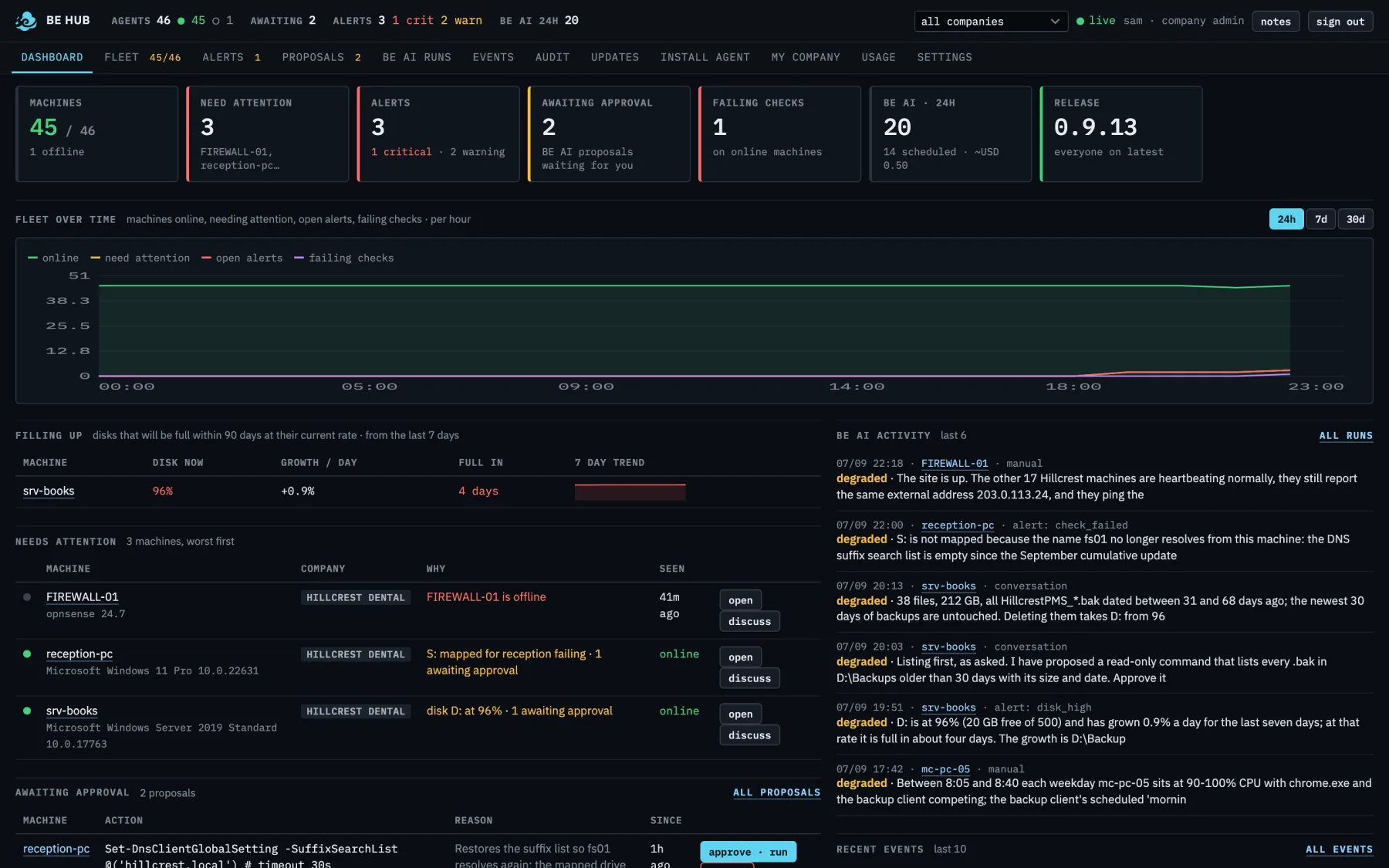
See, understand, propose, approve, verify. End to end, in one place.
Not a monitor-only pane and not an inventory list. The loop spans endpoints and the site infrastructure in front of them.
See the finding
A heartbeat every five minutes, and an event the moment a disk fills, a check fails or a machine reboots. Endpoints and site kit — firewalls, routers, the NAS — in the same fleet. Outbound only, so it works behind any router.
Understand: AI pulls the evidence
BE AI reads the history, then asks the machine read-only questions: diagnostics, processes, services, logs, checks. It writes a plain-English conclusion with a confidence level. It has not changed anything.
Propose the exact command
A change arrives as a proposal: the exact command and the reason. Read-only listings first when that is the honest next step; a mutating command only when a person has seen the evidence.
A named person approves or rejects
Approve, reject, or ask a follow-up in the same thread. The console works on a phone browser. Nothing runs without that name on the record.
Execute, verify, audit
The result comes back in plain language. Ask BE AI to verify the effect. Every question, call and approval sits in the audit trail.
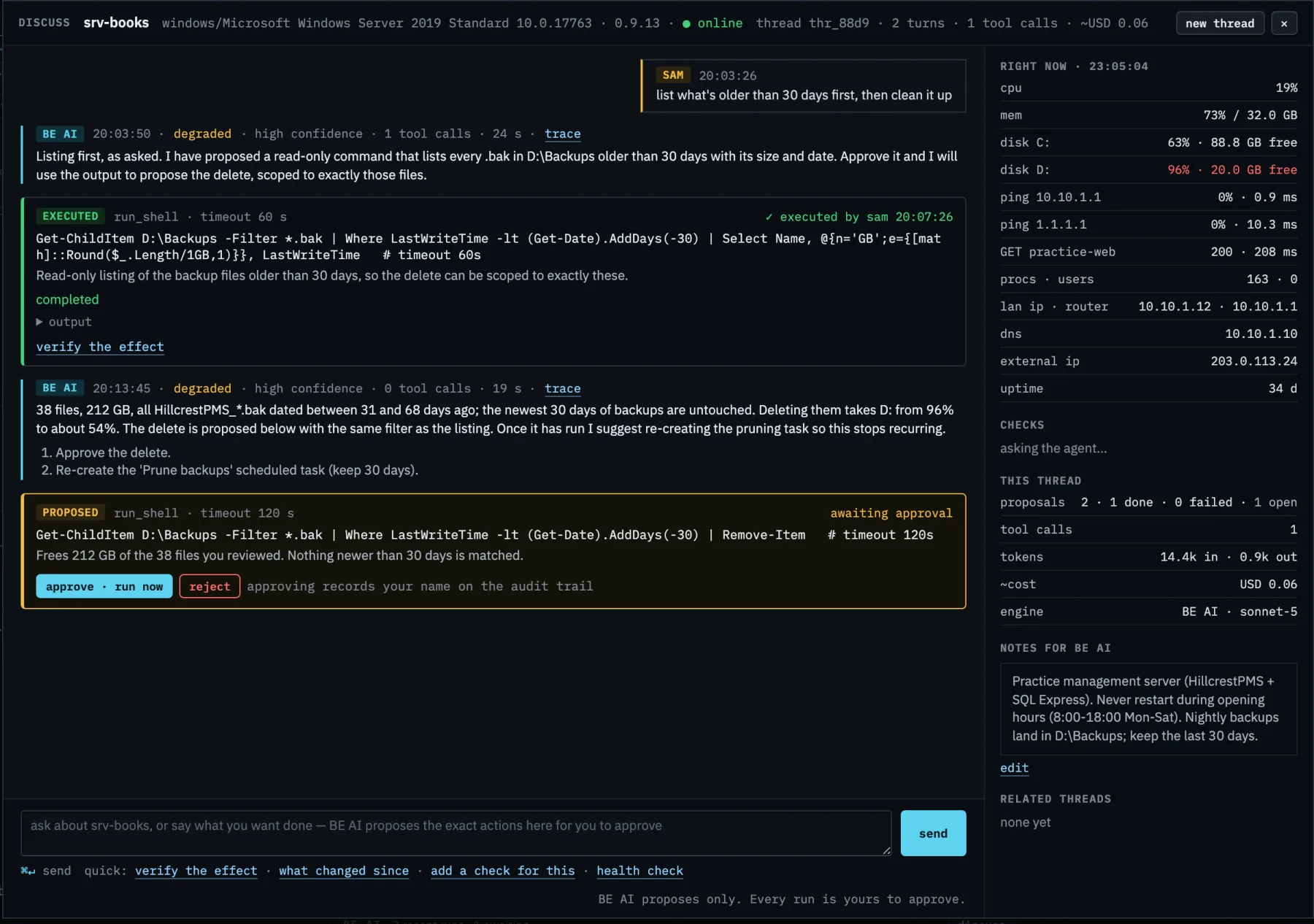
One screen for the whole fleet, one screen for the machine in front of you.
Cropped from the real console on a fictional fleet; every screen below is the product as it ships.
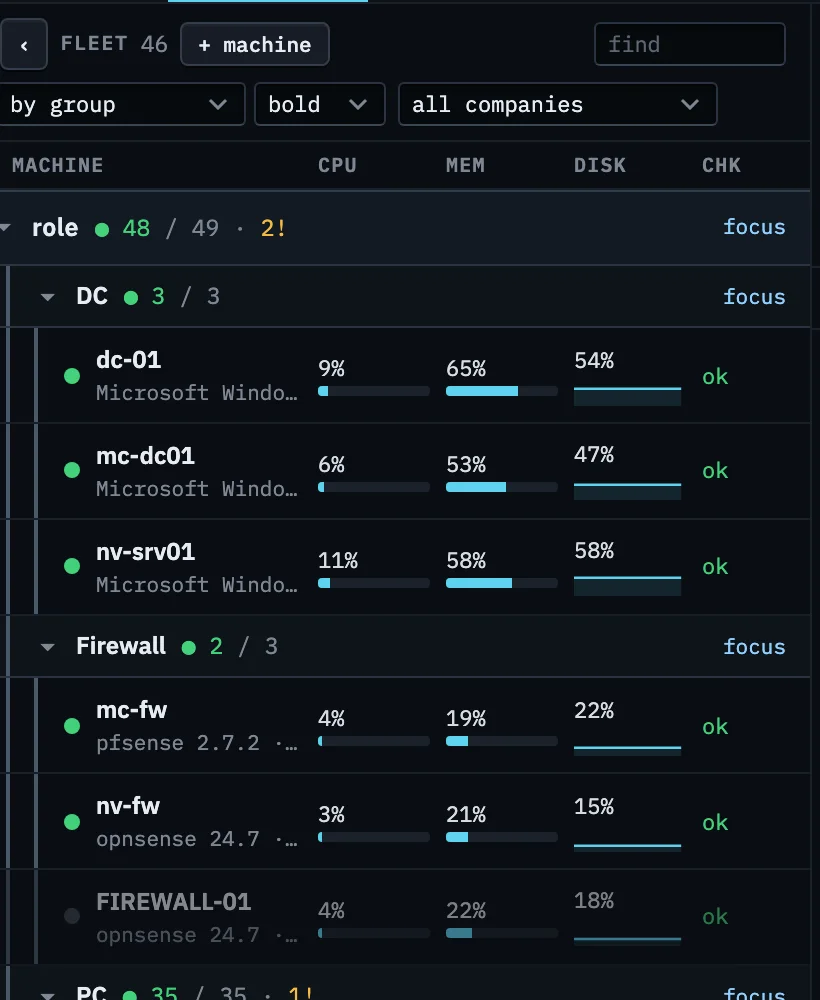
Fleet. Grouped by your tags, worst first. CPU, memory and a disk sparkline on every row, a check column that says ok or how many are failing, and firewalls next to the servers they protect.
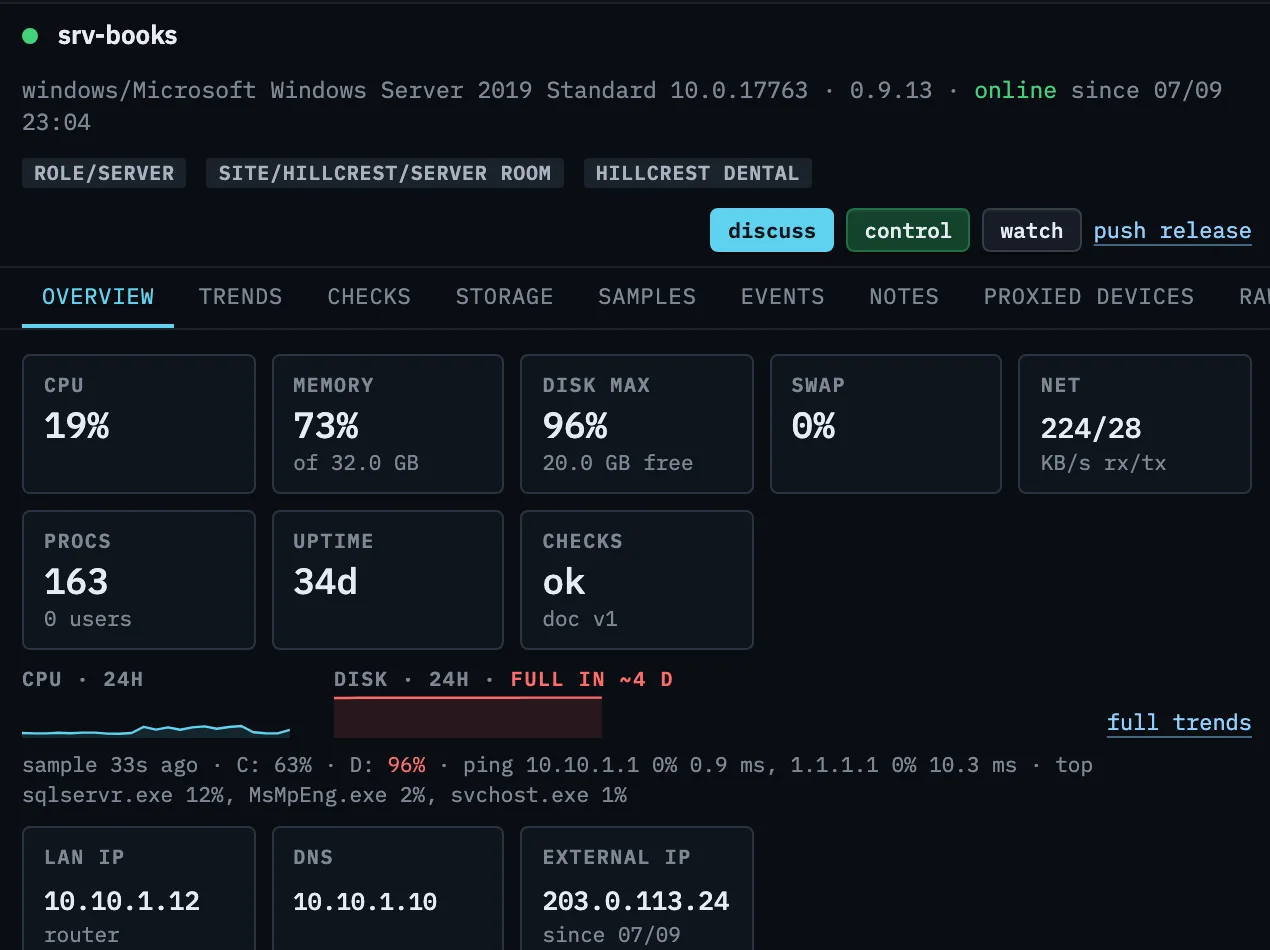
Machine. Everything about one machine on one screen: live tiles, a day of CPU and disk, when the disk will be full, its addresses, then its alerts, notes and BE AI history below. Discuss, control and watch are one click away.
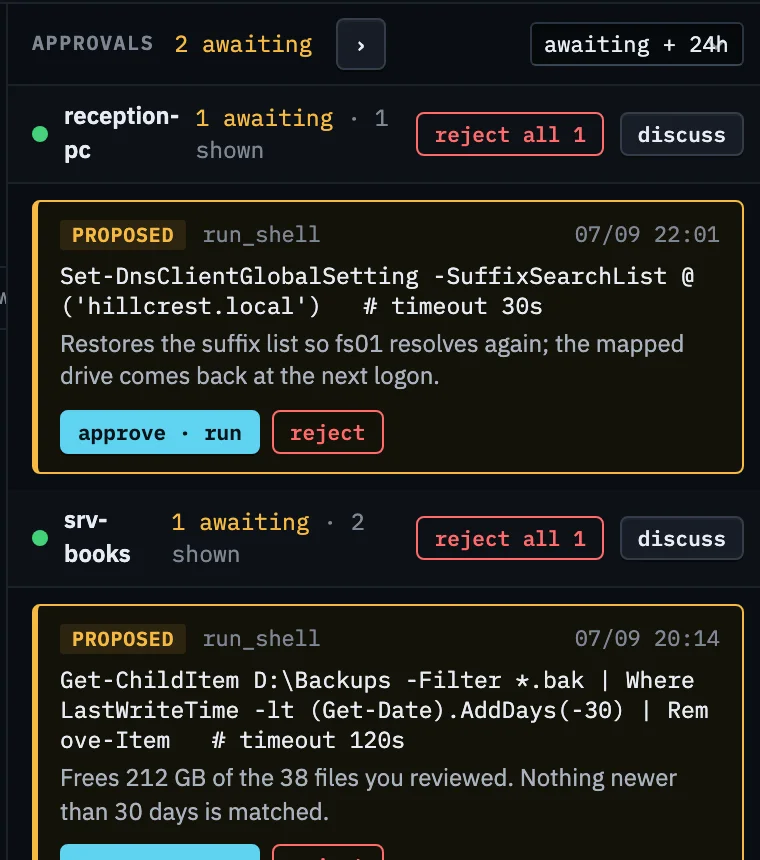
Approvals. What BE AI wants to run, as the exact command with a reason. Approve executes it and records your name. Reject records that too. Nothing in this column has run.
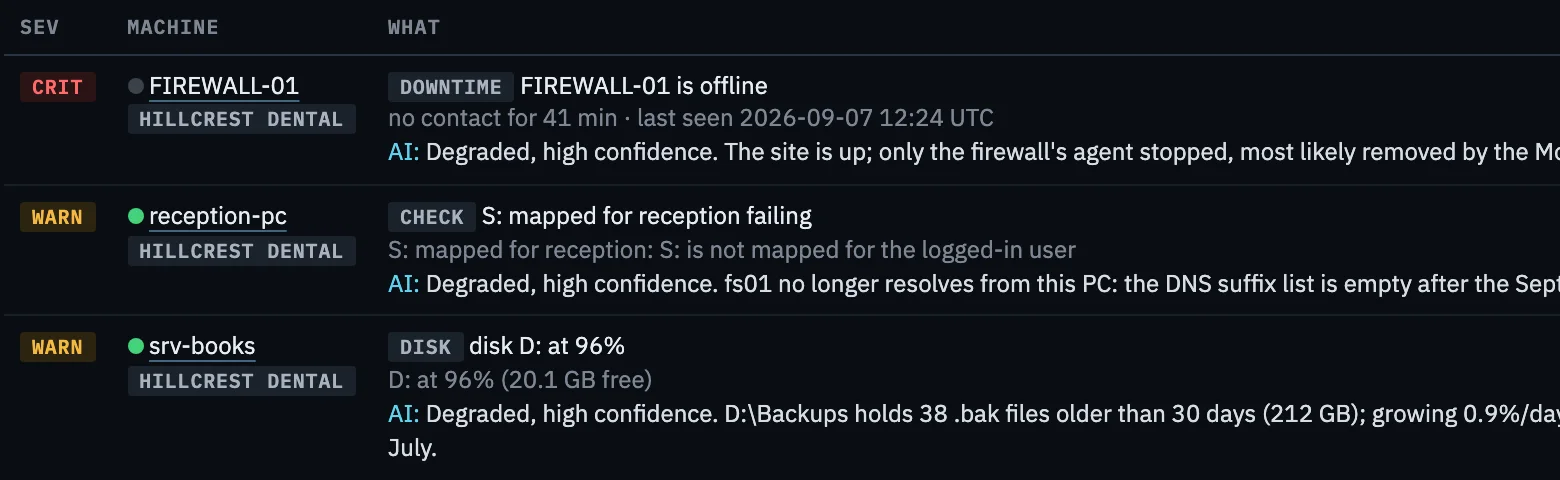
Alerts. One alert per machine and problem, with BE AI's assessment under it before anyone is woken. Rules decide who gets an email, a text, a phone call or a webhook, per customer, per severity.
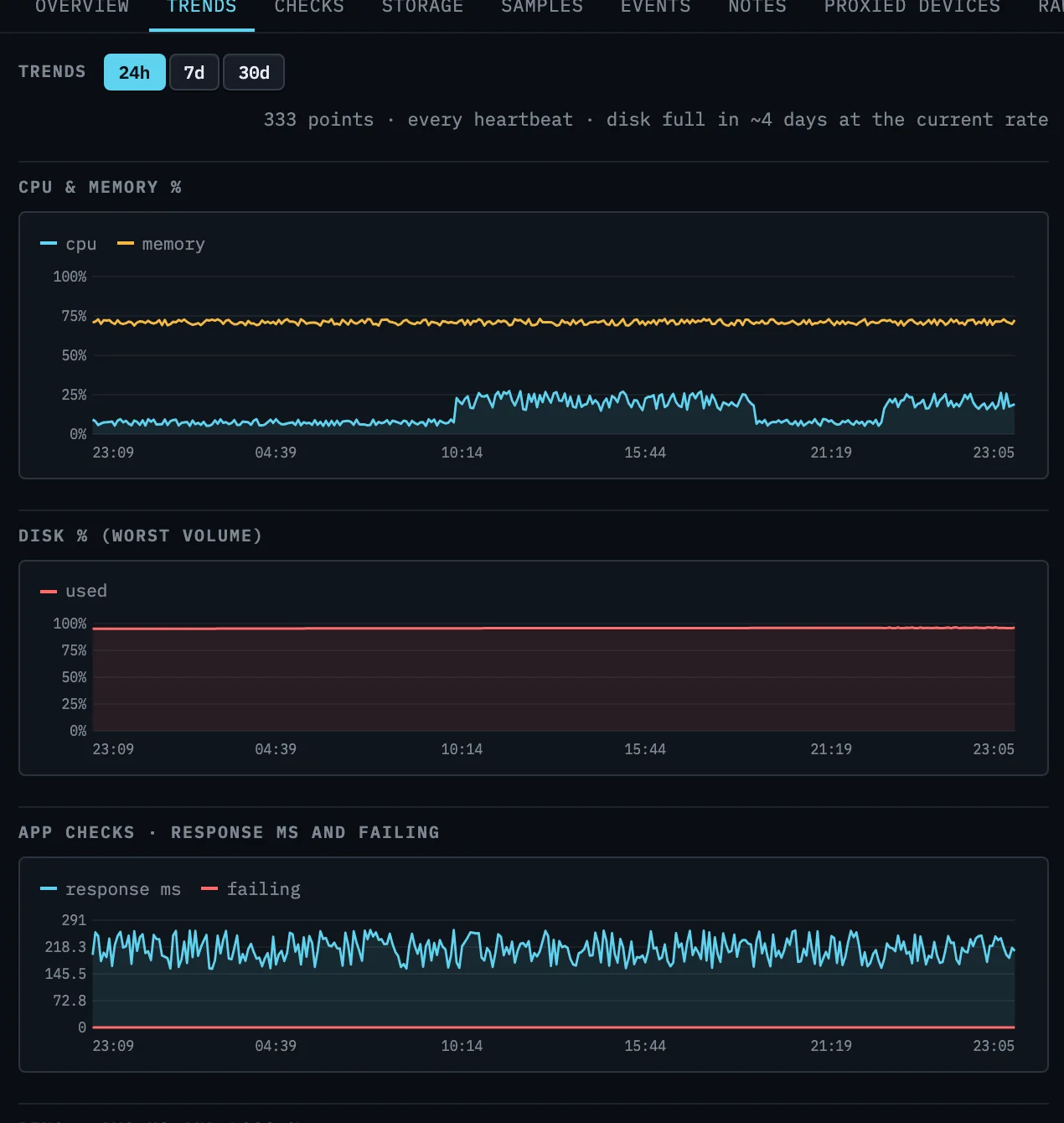
Trends. Every heartbeat for a day, hourly rollups for two years, sized so a fleet of hundreds stays quick to draw. CPU, memory, disk, application checks, ping and network per machine, plus a fleet chart on the dashboard.
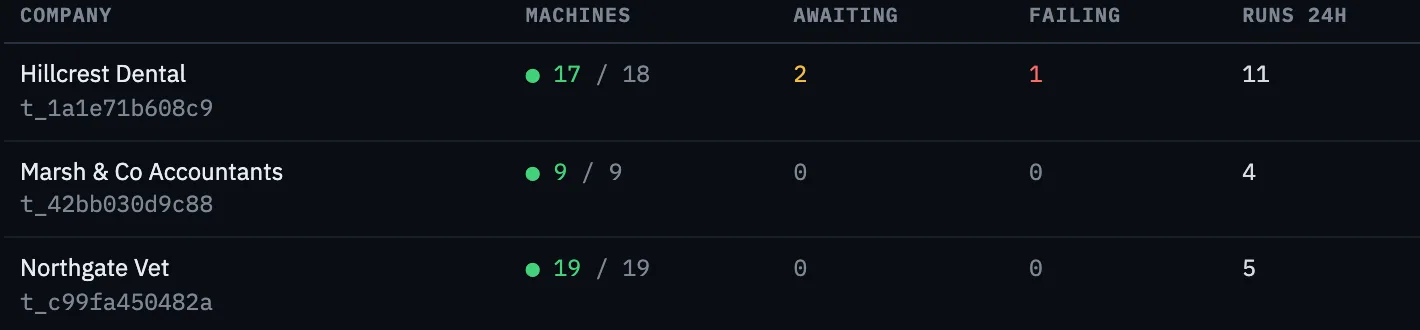
Companies. Each site or customer is its own company with an install link, its own sign-ins and its own usage. One estate or twelve, same console. Nobody sees anyone else's machines.
The RMM capabilities, then the investigator on top of them.
Watch, alert, check, remote control, saved scripts and patching — then an investigator that proposes rather than acts. AI is not a sidecar. It is how the ops loop writes the next command.
Alerts that reach a person
Offline, disk, failing check, reboot, degraded ZFS pool. Email, SMS, phone call or webhook, with grace periods so a planned reboot is not a 2 am page.
Custom checks, written in a sentence
"Alert me if the S: drive is not mapped for reception." BE AI turns it into a check, you approve, the agent runs it every minute.
A script library, not a script engine
Save the command you keep retyping, with {{variables}} the hub fills per machine. A person presses run; the exact text, the exit code and the output are kept. Nothing runs itself unless you give it a schedule.
Patching with a report
Every machine reports what it is missing. Approve an update once for a company, schedule the job in a window, allow or forbid restarts, and read a report that says what went in, what failed and why.
Nightly pass on every machine
BE AI reviews each included machine once a day and only proposes when something needs a decision. Include/exclude and the healthy skip protect the run pool; a quiet machine is not a run.
Firewalls and routers included
OPNsense, pfSense, VyOS, Teltonika 4G routers and TrueNAS are machines like any other: services, logs, cellular signal, config changes, pool health.
Hosted, on-premise, or your own cloud
The hub is one container with one data volume. Hosted by us, a box in your rack, or the cloud account you already pay for. Sydney hosted is one option, not the product.
Remote control, one click
Watch or take control of a Windows machine from the console, over the agent's outbound connection. No inbound port, nothing to install on your side, every session on the record. On by default per company; switch it off for the ones who want it off.
The AI writes the command. A named human still has to say yes.
That is the product, not a setting you can forget is on. No policy engine that remediates on its own. No AI shell. A saved script is text a person runs, or schedules. If you want the model to act without you, this is the wrong tool. Why AI can't write →
- ✓read tools automatic, write tools approved
- ✓the exact command on every proposal
- ✓reject is a first-class outcome
- ✓no unattended remediation engine
- ✗AI that executes on its own
- ✗changes with nobody's name on them
A global product. Put the hub where your policy says.
Same product, your data where you want it. One container, one volume, one outbound call to the AI API. Agents only ever need to reach your hub. Hosted by Binary Elements — Sydney is the hosted region we run today — or on-premise, or in your own cloud in the region you already use. Hosting options →
Binary Elements runs it
Sign in and start enrolling. Hosted in Sydney today; the product is not Sydney-only.
A box in your rack
Any host that runs a container. Data stays in the building.
Your cloud account
A small VM serves hundreds of machines, in your region.
The AI can read. Only a person can write.
BE AI never gets a shell. It works through a fixed, allow-listed set of tools, and every mutating tool sits behind a human approval on the hub. Whether a machine allows shell commands at all is decided in its own config file, which the hub cannot change. Everything a machine reports is treated as untrusted text. Why AI can't write →
- ✓outbound-only agent, no inbound ports, no VPN
- ✓Ed25519-signed updates, key kept offline
- ✓read tools automatic, write tools approved
- ✓per-company isolation enforced on every request
- ✓full audit trail: who asked, what ran, what came back
Most outages announce themselves weeks ahead. BE Hub reads the announcement.
A nightly pass over every machine, disks with a date they will be full, services that keep restarting, machines behind on releases, patch state, checks that drift. The things a good technician would look at every morning if there were time. How the nightly pass works →
- ✓nightly review of every included machine, only speaks when something needs a decision
- ✓"full in 12 days" on every disk from a week of history
- ✓patch and service health recipes on request or on schedule
- ✓checks that watch for drift: mapped drives, printers, VPN peers
The cases that show why a pane of glass is not enough.
Disk full at 3 am
Threshold alert says 96%. BE Hub says 231 GB of old backups on a 500 GB volume, growing 0.9% a day, and files a listing to approve. The case →
Site down, or box down?
Uptime check says the firewall is unreachable. BE Hub says the 4G router at the same site still answers, so it is the firewall, not the carrier. The case →
The slow morning
No alert at all. Asked why logons took 40 seconds, BE AI finds the backup job that ran late and pinned the domain controller. The case →
Internal IT first. Providers only when sovereignty is the reason.
Internal IT
Windows-heavy, multi-site, roughly 250 to 2,000 assets, with change-control, audit or residency pressure. Private healthcare and aged care, multi-site professional and financial services, mid-market education and other privacy-sensitive organisations. Who it is for →
Sovereignty-led providers
An MSP or IT company whose customers will not put the estate in a tool they cannot place. Same product, companies isolated, usage per customer. Secondary motion — we do not lead with a dozen-customer rollup. For IT companies →
Not for you
You want the AI to remediate unattended. You want an investigator that sits beside an RMM you intend to keep. You have no named person who can approve a change. Those are honest mismatches. The full not-for-you list →
Before you put an agent on a production box.
Is this an RMM?
Is this an add-on beside another RMM?
Can the AI run commands on my servers?
Can I take control of a machine?
Does it need inbound ports or a VPN?
Where does the data live?
One control plane. Named people approve every change.
Shadow your incumbent on up to 100 devices, or start a free trial. Your approvals, your data. Uninstall the agent and you are out.