 BE HUB
The primary RMM. One rule: AI cannot write.
Monitoring, alerts, custom checks, trends, remote control, saved scripts, patching and releases — then an investigator that writes the exact command for a named person to approve. This is not an add-on beside another RMM.
See, understand, propose, approve, verify. In one console.
Monitor-only tools stop at the number. Inventory panes stop at the list. BE Hub is the ops loop.
See
The finding: a heartbeat, an event, a failing check, a site that stopped answering.
Understand
BE AI pulls evidence: history, diagnostics, processes, logs. Read-only.
Propose
The exact command and the reason. Nothing has run.
Approve
A named person says yes or no. Reject is a first-class outcome.
Execute and verify
The result in plain language. Ask BE AI to check the machine again.
Audit
Who asked, what ran, what came back, who approved. Per company.
The loop covers endpoints and site infrastructure — firewalls, routers, storage — not only the PC that raised the ticket. One incident, start to finish →
Every machine, every five minutes, plus the moment something breaks.
Heartbeats
CPU, load, memory, swap, every volume with free space, network rates, processes, logged-in users, ping results, and on routers the cellular signal. Under 1.5 KB each.
Events pushed up
A disk crossing 90%, a check failing or recovering, a reboot, a degraded ZFS pool, an agent update. Events start investigations; nothing polls.
Network facts
LAN addresses and MACs, the default gateway, DNS servers and the external IP, so "is it the site or the box" is answered before anyone drives out.
Alerts that reach the right person, with the assessment attached.
What raises one
Offline past a grace period (critical), a custom check failing (its own severity), a disk filling (warning, critical at 97%), a degraded ZFS pool (critical), a reboot (notice). One alert per machine and problem; it resolves itself.
Who gets told
Rules per company: which tags, which kinds, minimum severity, then contacts. Email, SMS, phone call, or a webhook to whatever you already run.
Not woken for nothing
The first message waits a minute so BE AI's assessment can ride along. Re-occurrence only re-announces on escalation.
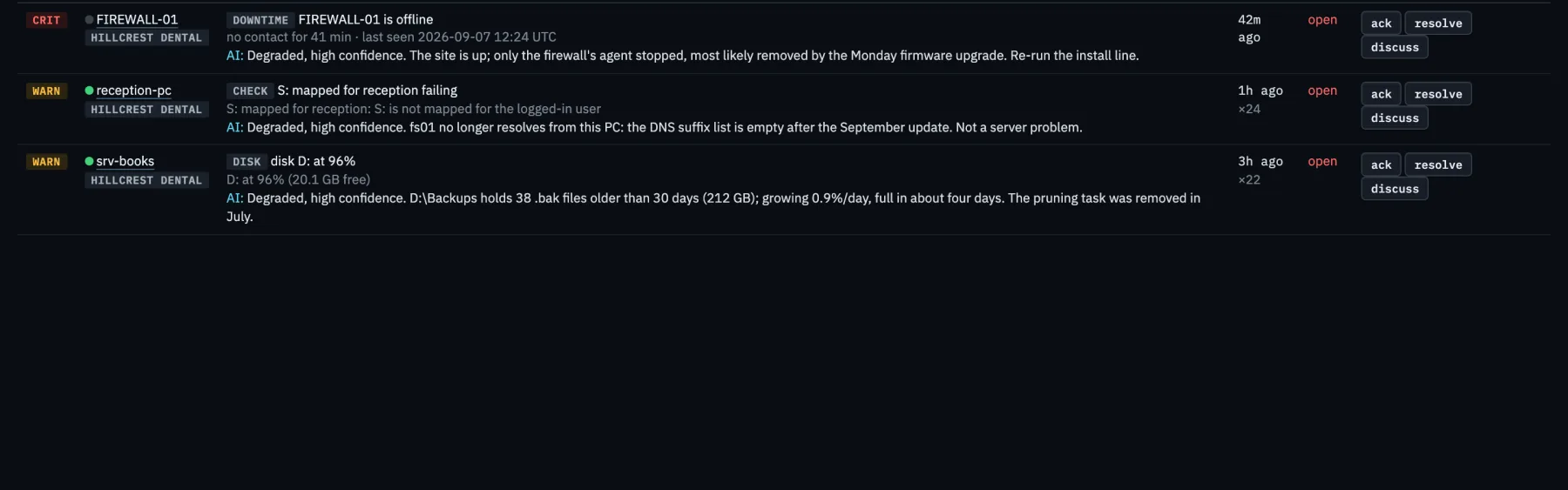
Custom checks you describe in a sentence.
Fifteen primitives, combined with all, any, not and when: ping, URL, DNS, TCP port, listening port, service, process, file or folder, file age, free space, printer, mapped drive, registry value, logged-in user. BE AI writes the check from your sentence; you approve; the agent runs it every minute and raises an alert when it fails.
"Alert me if the S: drive is not mapped for reception."
"Warn when / has less than 100 GB free."
"The label printer must be installed on the packing PC."
"Ping the head-office VPN every minute; alert on 25% loss."
{
  "id": "chk-drive-mapped-s",
  "name": "S: mapped for reception",
  "severity": "warn",
  "every": "1m",
  "rule": { "when": { "user_logged_in": {} },
            "then": { "drive_mapped": { "letter": "S" } } }
}Two years of history that still draws fast at fleet scale.
Hourly rollups
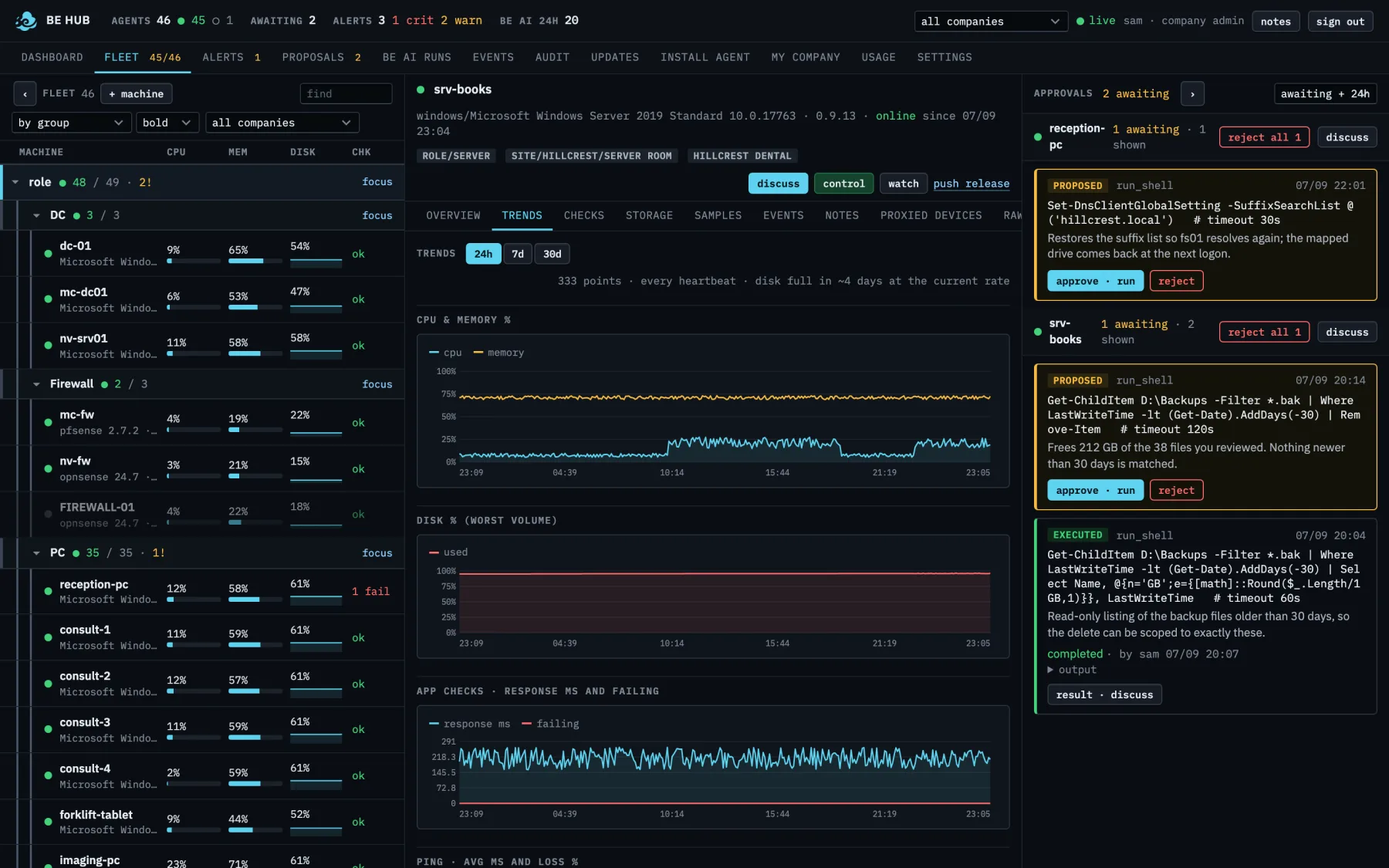
Raw heartbeats for 14 days, one row per machine per hour for two years, one row per company per hour. A fleet of hundreds is a few hundred rows per chart.
Filling up
Disk growth per day from the last week and a "full in 12 days" on the dashboard and on every fleet row.
Per machine
CPU and memory, disk, ping latency and loss, network in and out, over 24 hours, 7 days or 30 days.
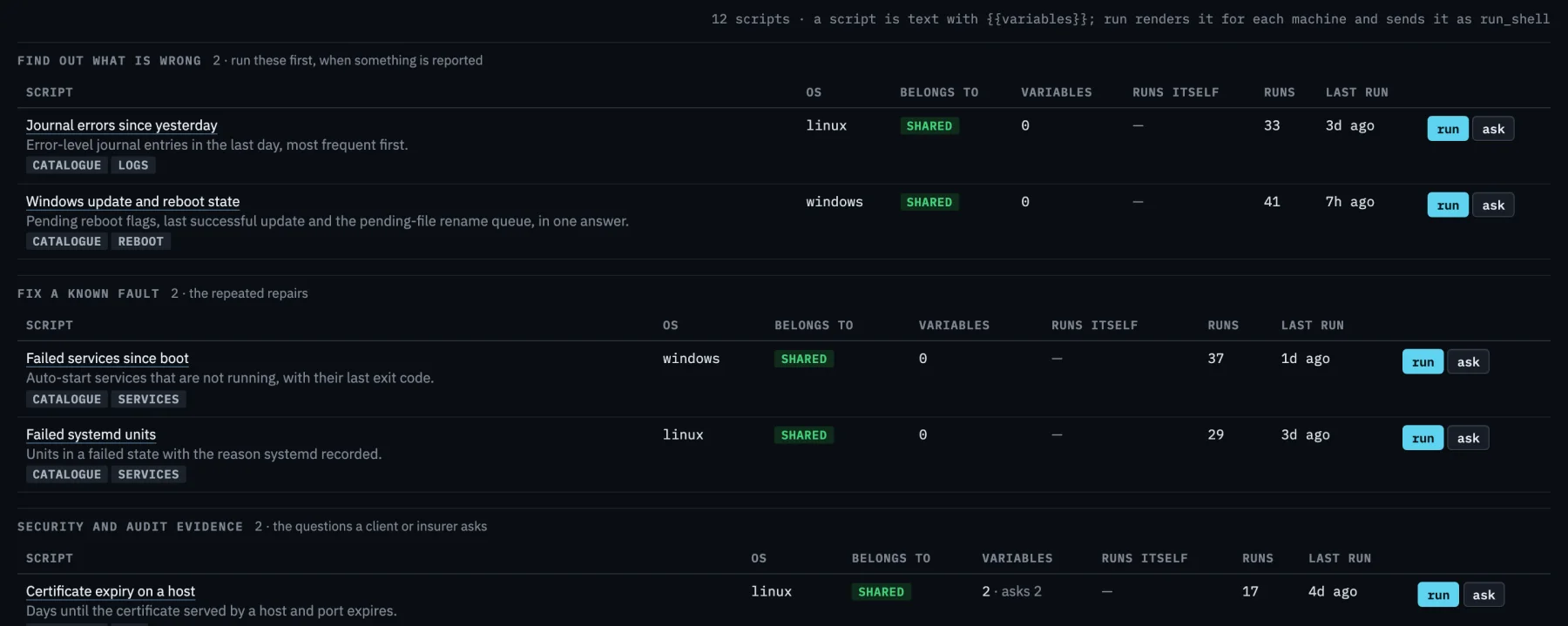
The command you keep retyping, saved once.
Not an embedded script engine. No interpreter, no agent framework, no code travelling to the machine: a saved script is text the hub renders and sends as a single approved command, and a machine with its local shell flag off refuses it like anything else.
Text with variables, not code
A script is a command with {{variables}}. The hub renders it per machine, filling the hostname, addresses, tags and anything else it already knows, and asks you for the rest. The agent receives one command, exactly as if you had approved it yourself.
Run it, or let it run
Pick machines from the fleet, see the exact text per machine before anything happens, then run up to fifty at a time. Give a script a time and days and it runs itself on the machines that are online then; an offline machine is skipped and recorded, never queued for six hours later.
Every run kept
The rendered text, who ran it, the exit code and the output, capped and kept. Long jobs survive a dropped connection, a hub restart and the reboot the script itself causes. Stop means stop: the process and everything it started.
- ✓organised by what a script is for, and by customer
- ✓a machine's tab suggests what its current state calls for
- ✓ask BE AI what a script does, or what one run of it means
- ✓save any approved command as a script in one click
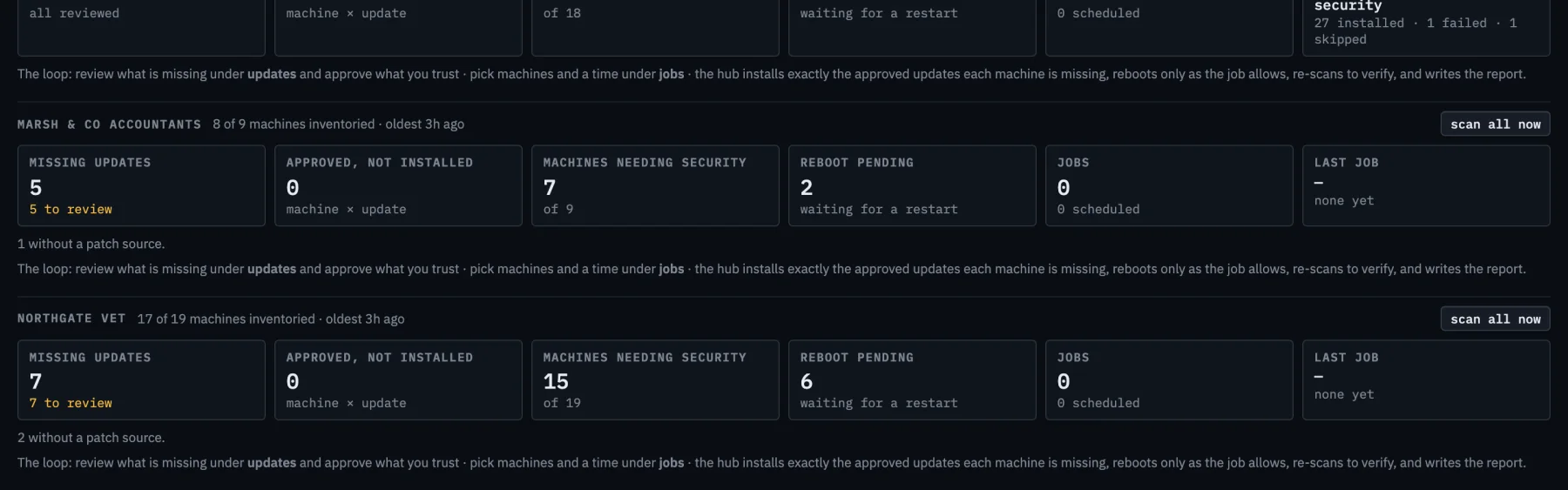
Patching, from inventory to a report that says what actually happened.
The loop is inventory, approve, schedule, deploy, verify, report. The verify step is the one most tools skip: after a job the machine is scanned again, and the report shows what is still missing.
Everything reports what it is missing
Windows Update and winget on Windows, apt and dnf on Linux with security updates marked, opkg on routers, softwareupdate on macOS, and a package inventory on firewalls, which keep their own updater. Re-checked twice a day without asking.
Approve once per customer
An update approved for a company covers every machine missing it. Approve the security ones in a click, decline what you do not want, send anything back to review. Nothing installs because it was approved: a job installs it.
A job you can plan
Choose machines by tag or by hand, updates by approval or by name, a time and a window, and whether restarts are allowed, required-only or forbidden. A machine offline for the whole window is skipped and says so.
- ✓a fresh inventory afterwards proves what really installed
- ✓per machine, per update: installed, failed with the source's own reason, or still missing
- ✓restarts announced on screen before they happen
- ✓survives the reboot it causes, and a hub restart mid-job
Remote control of Windows machines, from the console, in one click.
Sometimes the fastest fix is your own hands on the keyboard. BE Hub gives you that without giving anything else a way in.
Control or watch
Open a machine in the fleet and press control. The desktop opens in a browser window and you have the mouse and keyboard when the first picture lands. Watch is the same without touching anything.
No door to open
The picture and your input travel over the agent's existing outbound connection. No inbound port, no VPN, nothing listening on the customer's network, nothing for you to install. It serves the session the person is actually using, including Remote Desktop sessions, and an unattended server all the way from its sign-in screen.
On the record
A session is opened by a signed-in person, never by an API key and never by BE AI. Who, from where, which machine, why, when it started and how it ended are kept. What was typed is never recorded anywhere. Each customer can switch remote control off.
- ✓one person controls a machine at a time
- ✓Windows Server 2016 and later, Windows 10 and 11; macOS and Linux later
- ✓no file transfer, no clipboard from the machine to you, no blanking their screen
Signed agent releases, rolled out where you say.
Signed offline
Agents install only binaries signed by a key that never touches a server. The hub chooses which signed version a machine gets, and nothing else.
Staged roll-outs
Push to one machine, a tag, or a company. Watch each machine go pending, triggered, restarting, done, with a note when something refuses.
Release notes
Every version carries its notes in the console; machines on it are listed beside them.
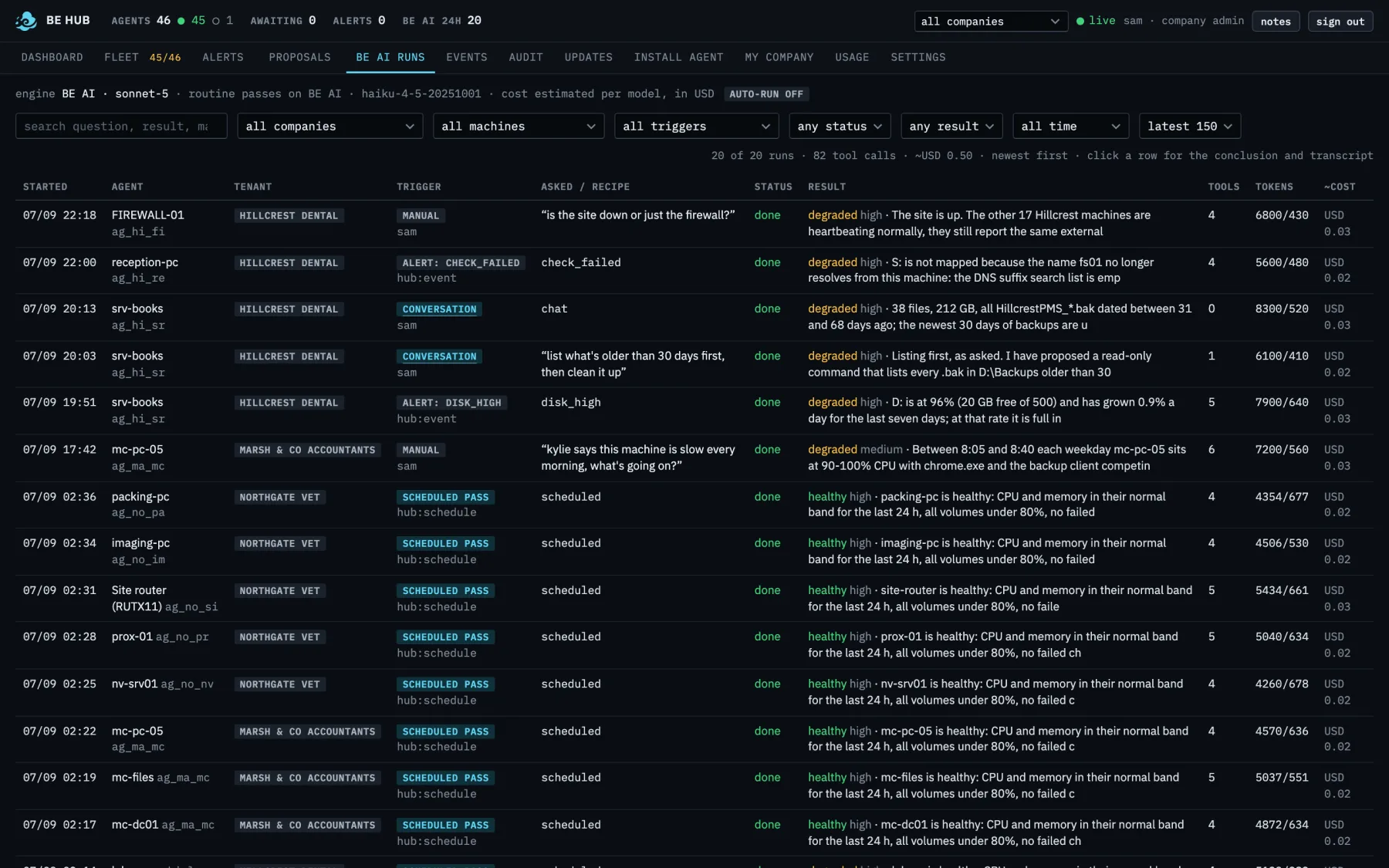
Then the investigator: BE AI reads the history and asks read-only questions.
The RMM capabilities above work without it. The investigator is how the ops loop writes the next command — still without acting.
Triggered by alerts
Disk high, check failed, reboot: each starts an investigation with a recipe suited to it, deduplicated so one problem is not investigated ten times.
A nightly pass
Once a day, at a time you pick per company, BE AI reviews every included machine and only proposes when something needs a decision. A machine that was healthy yesterday with nothing new is skipped. Preventative maintenance →
Conversations
Ask a question about a machine. Follow up. Say "clean it up" and get a proposal, not a paragraph of instructions.
Include and exclude
Per machine: in or out of AI entirely, out of alert investigations, out of the nightly pass. Per company: on or off, auto-run on or off, runs per day.
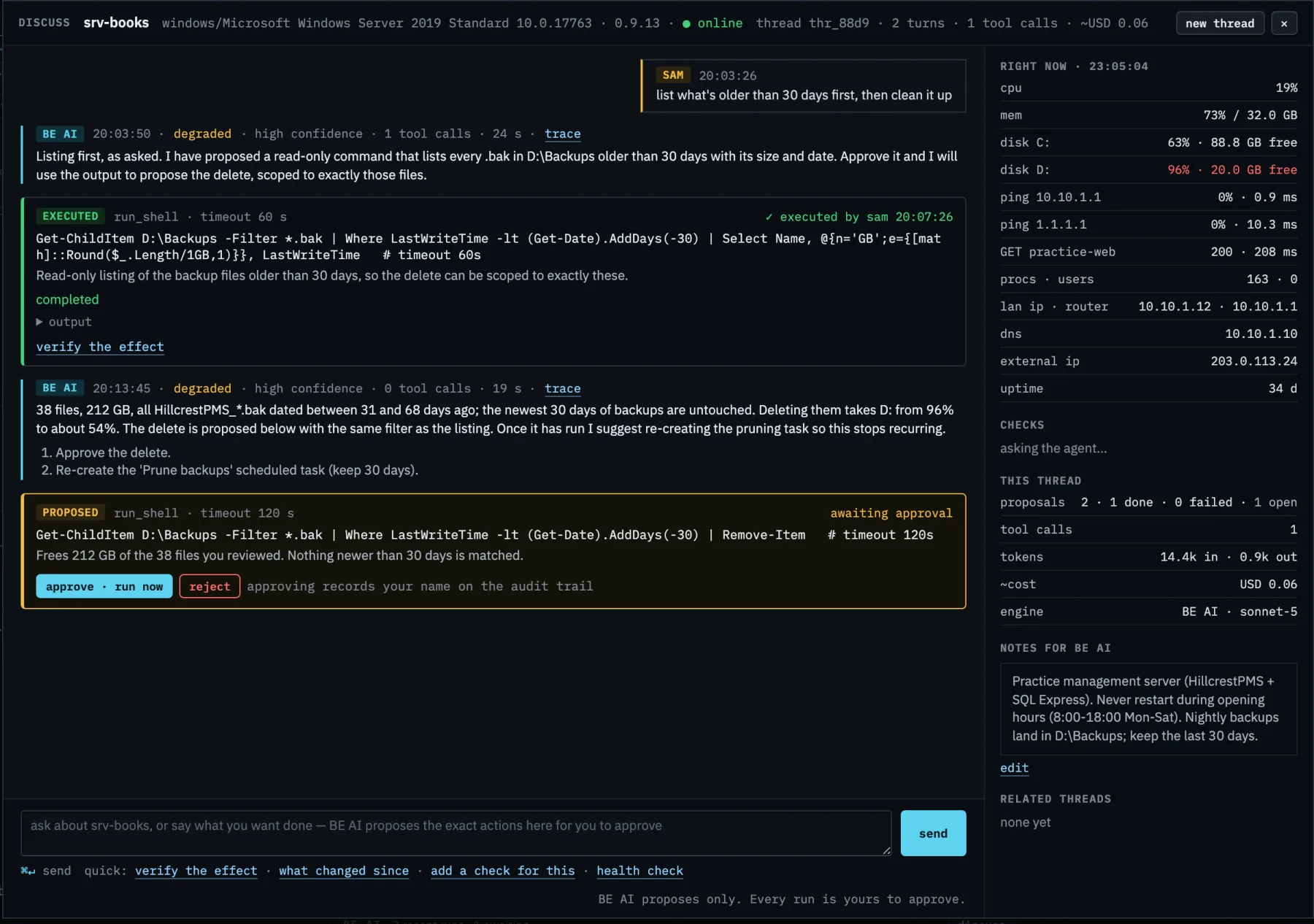
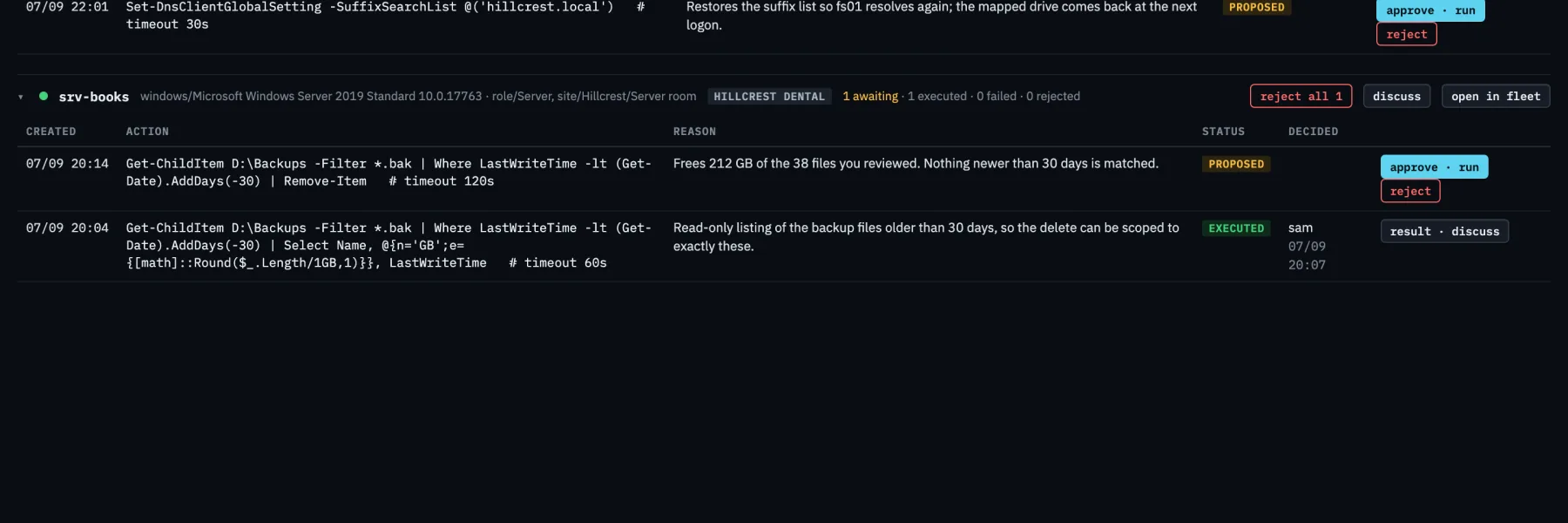
Proposals, approvals, results. Every step with a name on it.
Proposals, not actions
The exact command, the timeout and the reason. Restart a service, end a process, run a bounded command, add a check. Approve or reject inline in the console, which works on a phone browser as well as a laptop.
Plain-language results
"Completed without errors, 38 files listed" instead of an exit code. Ask BE AI to verify the effect and it checks the machine again.
Audit trail
Who asked, what ran, what came back, who approved. Sign-ins, failed sign-ins, rotations, every proposal decision. Per company.
A global product. Hosted, on-premise, or your own cloud.
Hosted by Binary Elements
Sign in and start enrolling. Backups, patching and uptime are ours. The hosted region we run today is Sydney; the product is not Sydney-only.
On-premise
One container, one data volume, one outbound call to the AI API. Agents only ever need to reach your hub, so a box in your own rack is enough.
Your own cloud
Any host that runs a container. A small VM serves hundreds of machines. Your data stays in your tenancy, and moving later is a copy of one volume.
No unattended automation, no code shipped to the endpoint.
The agent never receives a program. A saved script is text the hub renders and sends as one approved command, patching installs only updates you approved, and a machine whose local shell flag is off refuses all of it. Everything that changes a machine has a person's name against it. If you want the model to act without you, this is the wrong product.
- ✓monitor · alert · check · investigate
- ✓approve · run a script · patch · verify
- ✓release · roll out · audit
- ✗policy engines that act on their own
- ✗an interpreter or agent framework on the endpoint
- ✗changes with nobody's name on them
One control plane. Named people approve every change.
Shadow your incumbent on up to 100 devices, or start a free trial. Your approvals, your data. Uninstall the agent and you are out.